This tutorial explains how to create Manual Payroll Journal Entries in QuickBooks Online UK.
If your payroll software is different from your accounting software or if like me, you provide outsourced payroll services, you’ll still need to record the results in your books.
Even if you use QuickBooks Online, if your chart of accounts are not set up properly, automatic posting will not be done.
That’s where Manual Journal Entries come in.
What Are Manual Payroll Journal Entries?
Manual Payroll Journal Entries summarise your payroll activity — Salaries/wages, taxes, and deductions — into QuickBooks.
Each entry records the total cost of payroll as expenses and the amounts owed as liabilities.
Why you might need to record payroll manually
-
Your payroll is run using external software.
-
You want only summary-level payroll data in QuickBooks.
-
You prefer manual control over journal entries.
Usually, you’ll post one journal entry per pay period (weekly or monthly).
Payroll Accounts Needed for Manual Payroll Journals
Before you create your first Manual Payroll Journal Entry, check your QuickBooks Chart of Accounts includes the correct categories.
Expense accounts
-
Wages & Salaries (Debit)
-
Employer National Insurance (Debit)
-
Employer Pension Contributions (Debit)
All of these accounts carry debit balances, as they reflect the total cost of employees to the business.
Liability accounts
-
Net Wages Payable (Credit)
-
PAYE & NIC Payable (Credit)
-
Pension Contributions Payable (Credit)
-
Student Loan / Other Deductions (Credit)
💡 Tip: Use clear names such as “HMRC – PAYE/NIC” for better reporting.
Information You’ll Need Before Creating a Journal
From your payroll summary or reports, gather the following:
-
Gross pay (total before deductions)
-
Employee deductions: PAYE, NIC, pension, student loan, etc.
-
Employer contributions: Employer NIC and pension
-
Net pay total (the amount paid to employees)
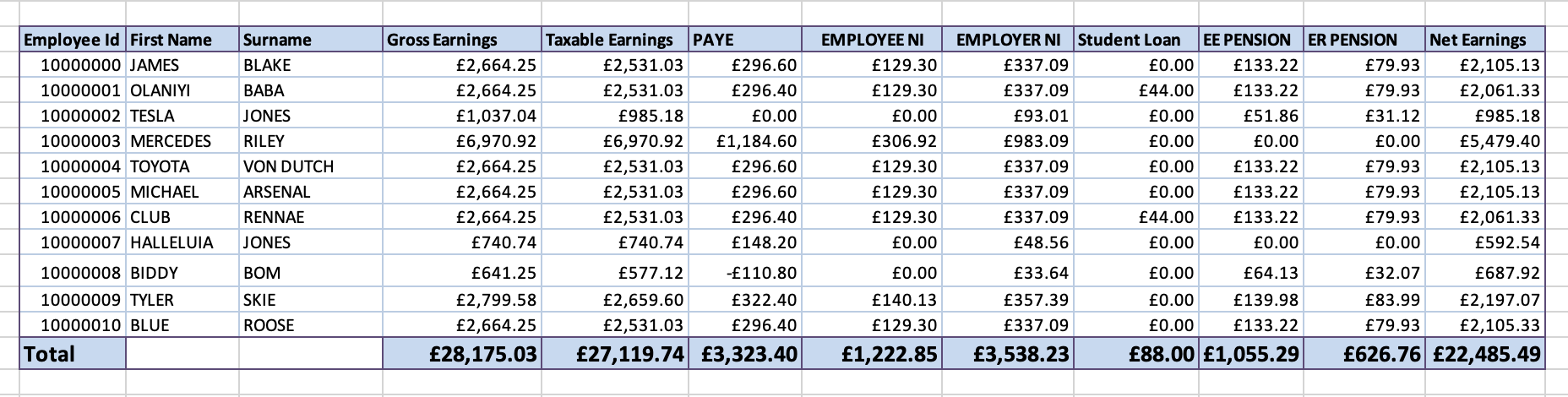
You’ll use these figures to create your Manual Payroll Journal Entry in QuickBooks.
How to Create a Manual Payroll Journal Entry in QuickBooks Online UK
Here’s the step-by-step process:
-
Go to + New → Journal Entry in QuickBooks Online.
-
Enter the pay date as the journal date.
-
Add your debit entries (expenses):
-
Wages & Salaries – debit total gross pay
-
Employer NIC – debit employer NIC
-
Employer Pension – debit employer pension
-
-
Add your credit entries (liabilities):
-
Net Wages Payable – credit total net pay
-
PAYE/NIC Payable – credit total PAYE and NIC owed to HMRC
-
Pension Payable – credit total pension contributions
-
Student Loan Payable – credit, if applicable
-
-
Add clear descriptions, e.g. “Staff costs”.
-
Confirm that Debits = Credits.
-
Click Save and Close.
| Account | Debits (£) | Credits (£) | Description |
|---|---|---|---|
| Wages & Salaries | 28,175.03 | Gross staff wages | |
| Employer NIC | 3,538.23 | Employer National Insurance contribution | |
| Employer Pension | 626.76 | Employer pension contribution | |
| Net Wages Payable | 22,485.49 | Net wages owed to employees | |
| P.A.Y.E. | 3,323.40 | PAYE tax due to HMRC | |
| P.A.Y.E. | 1,222.85 | Employee NIC due to HMRC | |
| P.A.Y.E. | 3,538.23 | Employer NIC due to HMRC | |
| Pension Payable | 1,055.29 | Employee pension deductions owed to provider | |
| Pension Payable | 626.76 | Employer pension contribution owed to provider | |
| Student Loan Payable | 88.00 | Student loan deductions owed to HMRC |
Totals:
Debits £32,340.02
Credits £32,340.02
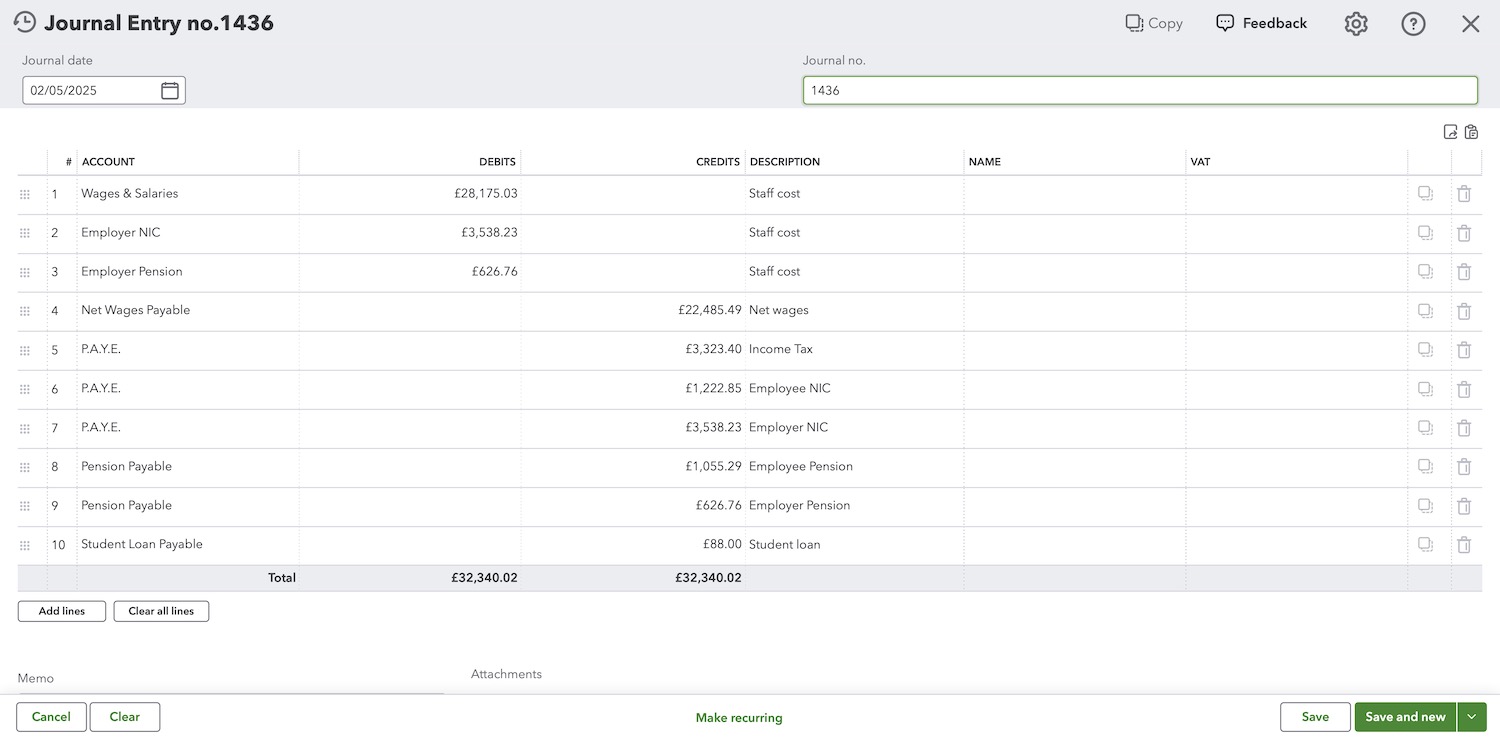
Now that the journal entries have been made and the net wages have been paid to the employees, you have liabilities owed to HMRC in the form of income tax, Employee NI, Employer NI and any other deductions. You also have amounts owed to the pension provider for both the Employee and Employer pension contributions.
Recording Payroll Payments
After you post your Payroll Journal Entry, you’ll need to make payments to clear your current liabilities.
When funds leave the bank account to pay Hmrc and pension fund, you can make the following Journal entries to clear each liability.
Paying Employees
| Account | Debit (£) | Credit (£) |
|---|---|---|
| Net Wages Payable | XXX | |
| Bank Account | XXX |
Paying HMRC
| Account | Debit (£) | Credit (£) |
|---|---|---|
| PAYE/NIC Payable | XXX | |
| Bank Account | XXX |
Paying Pension Provider
| Account | Debit (£) | Credit (£) |
|---|---|---|
| Pension Payable | XXX | |
| Bank Account | XXX |
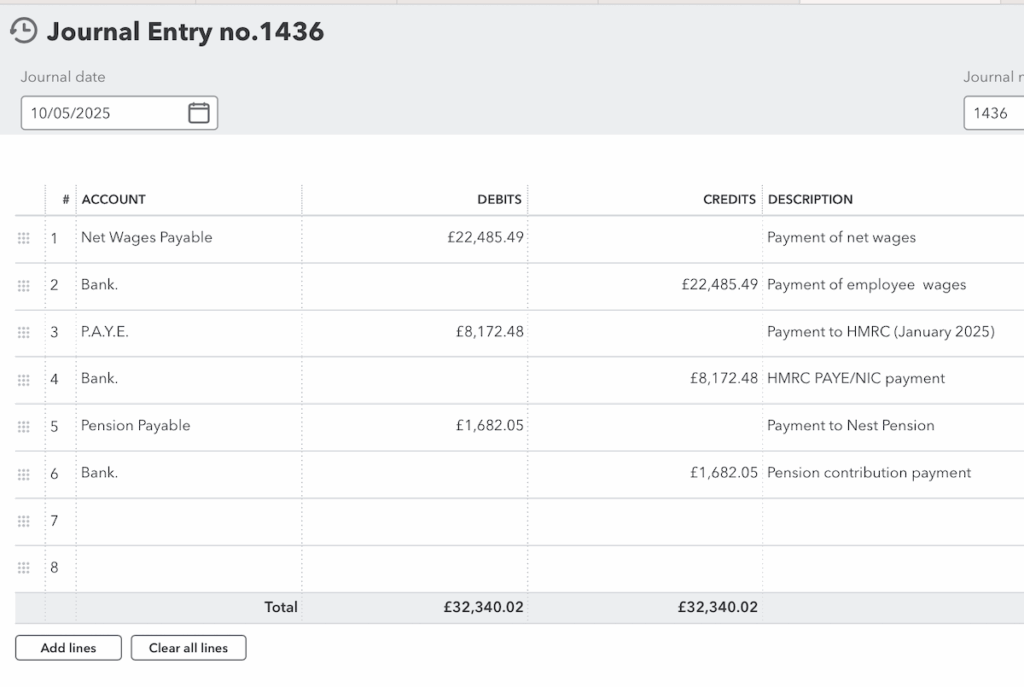
If the payments are made in full, all liability accounts (Net Wages Payable, PAYE/NIC Payable, Pension Payable) should reduce to £0.
Common Mistakes to Avoid When Posting Manual Payroll Journal Entries
Avoid these typical errors to keep your payroll accounts accurate and compliant:
- Forgetting to expense include employer NIC or pension contributions.
- Posting employee deductions to expense accounts instead of liability accounts.
- Using the wrong journal date or pay period.
- Failing to clear payroll liabilities after payments are made.
- Posting the bank payment against employer and pension cost to employer innsstead of the liabilities (ie PAYE, Pension payable)
✅ Tip: Always cross-check each Manual Payroll Journal Entry against your payroll summary before posting to ensure complete accuracy.